
The Ultimate Guide to Working From Home
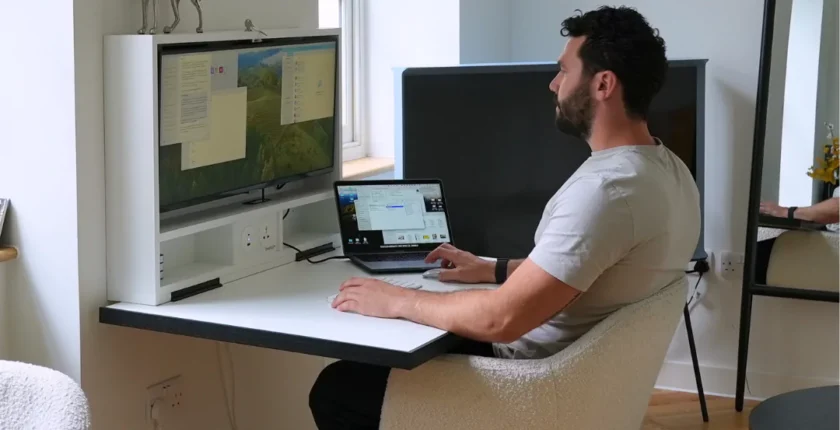
Working from home is more than just setting up a desk and logging into your laptop — it’s about creating a balanced, productive, and sustainable work lifestyle. To succeed, you need the right workspace setup, time management, mental well-being strategies, and digital communication tools. This ultimate guide explores everything from productivity hacks to ergonomics, helping you work smarter, stay focused, and maintain a healthy work-life balance.
Introduction
The rise of remote work has completely reshaped the modern workplace. Whether you’re a freelancer, remote employee, or entrepreneur, working from home (WFH) offers flexibility, autonomy, and comfort — but it also comes with challenges like distractions, isolation, and burnout.
According to a 2024 Gallup Report, nearly 38% of full-time workers in the U.S. now work remotely either part- or full-time. The key to thriving in this setup lies in discipline, structure, and a thoughtfully designed workspace.
This ultimate guide to working from home will help you master your routine, design your ideal office, and boost your overall well-being while staying efficient and motivated.
1. Setting Up the Perfect Home Office
A well-designed home office sets the foundation for success. It should be comfortable, ergonomic, and distraction-free.
Ergonomic Furniture
- Choose an adjustable chair that supports your spine.
- Use a desk at elbow height to maintain proper posture.
- Consider a standing desk to alternate positions throughout the day.
💡 Lighting and Ambiance
- Position your desk near a natural light source.
- Use soft, warm lighting to prevent eye strain.
- Keep decor minimal — clutter can reduce focus.
2. Time Management and Routine
Without structure, working from home can easily blur personal and professional boundaries.
Create a Consistent Schedule
Start and end your work at the same time daily. Treat your home office as you would a corporate workspace.
Use Productivity Techniques
- Pomodoro Technique: Work for 25 minutes, then take a 5-minute break.
- Time blocking: Dedicate specific hours to meetings, deep work, and breaks.
- Task batching: Group similar tasks to improve efficiency.

3. Communication and Collaboration Tools
Communication is the lifeline of remote work. Thankfully, a variety of tools make virtual collaboration easier than ever.
Essential Tools
- Slack – real-time team messaging
- Zoom – video conferencing
- Asana – project management
- Google Workspace – file sharing and collaboration
- Microsoft Teams – integrated business communication
4. Maintaining Work-Life Balance
One of the biggest challenges of working from home is knowing when to stop working. Without boundaries, burnout is inevitable.
Set Physical and Mental Boundaries
- Keep your workspace separate from personal areas.
- Log off work tools after hours.
- Avoid checking emails during personal time.
Practice Self-Care
Incorporate mindfulness, short walks, or light exercise during breaks. Regularly disconnect from screens to recharge.
5. Staying Motivated and Connected
Working alone can sometimes feel isolating. Combat this by fostering social connections and celebrating small wins.
Build Social Interaction
- Join online communities or virtual coworking spaces.
- Attend webinars and industry meetups.
- Engage in team “virtual coffee chats” or fun Slack channels.
Set Achievable Goals
Define weekly milestones and reward yourself when you hit them. Motivation grows with progress.
6. Digital Security and Data Privac
Working remotely means handling sensitive data from home networks — which can be risky without proper precautions.
Protect Your Data
- Use a VPN (Virtual Private Network) for all work-related activities.
- Install antivirus software and multi-factor authentication (MFA).
- Regularly update passwords and back up files.
7. Health and Ergonomics
Sitting for long hours can impact both physical and mental health. Prioritize movement and ergonomic design.
Incorporate Movement
- Stretch every hour.
- Try standing meetings or short yoga sessions.
- Use wearables like Fitbit or Apple Watch to track activity.
Stay Hydrated & Nourished
Keep water nearby and eat balanced meals. Avoid excessive caffeine or snacks that cause energy crashes.
8. Tools and Apps for Remote Success
Here are some powerful tools to enhance your workflow and collaboration:
| Category | Tool | Purpose |
| Project Management | Asana, ClickUp | Task tracking |
| Communication | Slack, Zoom | Team chat & meetings |
| File Storage | Google Drive, Dropbox | Cloud storage |
| Focus Tools | Forest, RescueTime | Productivity tracking |
| Note-taking | Notion, Evernote | Information management |
FAQs
1. How can I stay productive when working from home?
Create a structured schedule, minimize distractions, and use productivity apps to stay on track.
2. What equipment do I need for a home office?
A reliable laptop, ergonomic chair, desk, good lighting, and stable internet connection are essential.
3. How do I avoid burnout when working remotely?
Set clear boundaries, take breaks, and practice self-care daily.
4. What are the best tools for remote collaboration?
Slack, Zoom, Trello, Google Workspace, and Asana are among the top collaboration tools.
5. How can I maintain communication with my team remotely?
Schedule regular check-ins, encourage open communication, and use video calls for personal connection.
Conclusion
Working from home is not just a temporary trend — it’s the future of work. By investing in the right tools, routines, and self-care habits, you can thrive in a remote environment while maintaining productivity, mental health, and happiness.
Remember: the most successful remote workers are those who balance flexibility with discipline.