

How to Make Digital Stickers to Sell on Etsy
How to Make Digital Stickers to Sell on Etsy Digital stickers are one of the easiest digital products to sell on Etsy in 2026—because they’re fun, low-cost to create, and people buy them repeatedly for planners, GoodNotes, Notability, and digital journaling. The best part? You create stickers once and sell them forever, which makes this a perfect passive income product for Pinterest audiences.
In this guide, you’ll learn exactly how to make digital stickers and sell them on Etsy step-by-step. Each idea includes an image prompt for Pinterest pins.
Pick a Sticker Style That Sells (Kawaii, Minimal, Boho, Planner Icons)
Before designing anything, choose a sticker style that has demand. Popular Etsy sticker styles include: cute kawaii stickers, minimalist planner icons, boho aesthetic stickers, habit trackers, label stickers, and seasonal sticker packs. Pinterest users love clean, aesthetic designs that match their planner theme. The more consistent your style is, the more your shop feels professional.
Don’t try to create random sticker designs in the beginning. Stick to one theme and build a matching collection. When your stickers look like a brand, buyers are more likely to purchase bundles. Bundle sales are the secret to higher income because people prefer buying complete sticker packs, not single items.
Use the Right Tools (Canva, Procreate, or Illustrator)
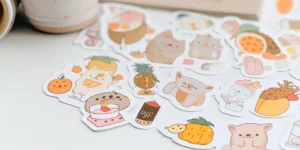
You don’t need expensive software to start. Many beginners use Canva to create sticker shapes, icons, and label sets. Canva is perfect for minimalist stickers and planner elements. If you want hand-drawn stickers, Procreate on iPad is a top choice. More advanced sellers use Adobe Illustrator for clean vector stickers.
Pick the tool that matches your skill level. Canva is easiest, Procreate is best for artistic styles, and Illustrator is best for professional vector packs. Start simple—your goal is selling, not perfection. As you earn money, you can upgrade your tools and improve design quality.
Design Stickers in the Correct Size (High Quality PNG)
Sticker quality matters. Digital sticker buyers expect crisp clean images that look good in GoodNotes and digital planners. Create stickers at high resolution (300 DPI) so they don’t look blurry when resized. Most sellers export each sticker as transparent PNG, which makes it easy for buyers to drag-and-drop into planners.
You can sell stickers as individual PNG files or as sticker sheets. Sticker sheets are popular because they look organized and premium. The key is clean edges, consistent sizing, and matching color palettes. When your stickers are high-quality, customers leave better reviews, and Etsy promotes your shop more.
Make Sticker Sheets (The #1 Best Seller Format)
Sticker sheets are collections of stickers arranged neatly on one page. They sell better because buyers love getting a full set at once. Example sheets: “meal planning icons,” “work from home stickers,” “self-care tracker,” “study planner pack,” etc. Sticker sheets also look amazing in Etsy mockups, which helps you sell more.
In 2026, aesthetic sticker sheets are trending because digital journaling is huge. Make matching sets with consistent style and colors. You can create 4–10 sticker sheets per bundle. Bundles increase your revenue because instead of selling a $2 product, you can sell a $8–$15 sticker pack.
Create Etsy Listing Images (Mockups That Convert)
Your sticker design matters—but your listing images sell the product. Etsy buyers want to SEE how stickers look inside a planner. Use mockups of iPads, digital planners, and sticker sheet previews. Add simple text overlays: “Instant Download,” “GoodNotes Stickers,” “PNG + Sticker Sheet.”
Use 6–10 images per listing. Include: bundle preview, close-ups, color variations, and “what you receive” slide. Clean mockups make your shop look professional and increase conversion rate. Pinterest audiences love aesthetic visuals—so your Etsy listing photos should match Pinterest style for best results.
Price Stickers for Profit (Beginner-Friendly Pricing Strategy)

Many beginners price too low. Digital products have no shipping cost, so your pricing should reflect value—not time spent. Single sticker sheets can range from low price, while bundles sell for more. The best approach is selling bundles because it increases your average order size.
Start with 1–3 bundles and one premium bundle. Example: “50 minimalist icons,” “100 boho stickers,” etc. Offer limited-time discounts at launch to gain sales and reviews. Once you collect reviews, you can raise prices. In 2026, Etsy rewards listings with sales history, so your first goal is traction.
Use Pinterest to Drive Etsy Traffic (Free Sales Machine)
Pinterest is the perfect platform for digital sticker sales because planners, journaling, and aesthetic organization content performs extremely well. Create Pinterest pins showing your sticker sheets, bundles, and planner mockups. Use keyword titles like “Digital Stickers for GoodNotes,” “Minimal Planner Stickers,” “Boho Digital Stickers Bundle.”
Post consistently: 3–5 pins per day or schedule content weekly. Pinterest traffic is long-term—pins can bring Etsy sales for months. The more pins you create, the more chances you get for a viral pin. Pinterest can turn your Etsy shop into a passive income machine when done consistently.
Scale Your Sticker Business (Launch Collections + New Themes)
Once your first sticker pack sells, don’t stop—scale by creating collections. Example: create a “Minimal Planner Collection” with weekly planners, monthly labels, habit trackers, and journaling stickers. Collections increase repeat buyers because customers love matching designs.
Also use seasonal themes: back-to-school, Christmas, Ramadan, summer, fall cozy. Seasonal sticker bundles sell fast because people want new planner aesthetics. In 2026, trend-based sticker packs are huge. The more collections you create, the more your shop becomes a full digital sticker brand.
Conclusion (Pinterest-Friendly Wrap-Up)
To make digital stickers to sell on Etsy:
pick a style + niche
design in Canva/Procreate
export high-quality transparent PNG
create sticker sheets + bundles
use mockups to sell
drive traffic with Pinterest